The Ghost in the Machine
This blog post is mostly about how I'm using AI in post-production and partly about a voice I heard from deep within a machine's imagination.
"Let's just fix it in post" is not the best way to work but sometimes the challenge is enjoyable. In this instance I was working to repair a backup recording sent to me when the main recording was lost, and the particular combination of issues meant that there was scope for using AI tools in the audio repair process.
Analysing the original recording
The recording was of a live event: an interview with one host, Julie, and one guest, Jane. The live audience was audible on both of their tracks.
The original audio sounds as follows (I've faded this in and changed the gain, but it's otherwise unchanged)
I don't know how this recording was made but I think it was with lapel mics. This is what I can hear:
Two speakers on a stereo channel panned left and right
Lots of bleed
Lots of reverb
Unusually high noise floor, presumably from the recording device
A few recording issues such as random high frequency tapping (something hard tapping against the microphone?) and low frequency bumps
The first step was to split this stereo file into two mono files and then pan them to the centre. This gives me a much clearer picture of what's going on.
I can hear that Julie's audio is pretty clear, but that there's a lot of bleed. It's possible that her lapel mic was facing towards Jane.
Julie's audio:
Jane's audio track is harder to understand due to excessive reverb, but in this track the bleed is much quieter than the direct signal. It's possible that her lapel mic was facing away from Julie but towards a reverberant surface.
Jane's audio:
This combination of factors meant that the audio was a good candidate for AI regeneration. Studio Sound, which is a part of Descript, works by analysing a recording and then completely regenerating the voice without recording errors. Jane's audio had much less bleed than direct signal so the AI algorithm would be able to easily identify which was her voice and recreate it. However, the resulting audio needed much more work to make it sound natural again.
Layering in an AI recording
AI voice regeneration is a good idea in theory but it has its limitations. It often sounds strange and robotic, especially with a recording that has a medium to large amount of background noise and this one was no exception.
You can hear that the audio is clipped and cuts off sharply at the end of words. Usually in this situation I would layer the AI recording back in with the original recording, but in this case I layered it in with Julie's recording. You'll remember that Julie's recording had a large amount of bleed - Jane's voice was quite audible throughout - and this seemed like the perfect way to preserve some of the original sound of the speech and room reverb.
But I'm telling the story in the wrong order. Before I got to layering these files together I treated Julie's track.
Processing Julie's audio
You'll remember that Julie's track had
An unusually high noise floor, presumably from the recording device
Lots of bleed
A fair amount of reverb
A few recording issues such as random high frequency tapping (something hard tapping against the microphone?) and low frequency bumps
The first thing that I treated was the noise floor. As this source of noise was regular and predictable I used the traditional form of noise reduction, which is very effective for this purpose and doesn't require a huge amount of computing power. I isolated a small section of "silence", taught the computer to recognise that sound, and then instructed the computer to remove it. I was using Izotope's RX8 Spectral De-noise, but any traditional noise reduction plugin would have been effective.
After that I used the Supertone Clear noise reduction plugin to slightly reduce the background noise on Julie's track and enhance her voice. This plugin uses AI to separate out ambience, the voice and the voice reverb and lets you decide the right balance of the three. It's very easy to use and quite effective. I used it lightly partly because it sounds better that way and partly because I wanted to preserve some of the character of the event: a live recording with an audience.
I also went through and manually fixed a lot of recording errors such as the bumps and taps using Izotope's tools, primarily spectral repair and de-rustle. De-rustle is pretty user friendly but spectral repair requires a bit of practice. Basically you work with an audio file that has been visually represented as frequencies over time: a spectrogram. With practice you come to visually recognise which parts of the file are speech (or other desirable audio) and which parts are not, then you outline and delete/replace the parts that are not. It requires uniting your visual pattern recognition capabilities with an understanding of where unwanted sounds are sitting in the frequency spectrum. Like all of these tools it also requires judgement of how much should be left in and how much can be taken out.
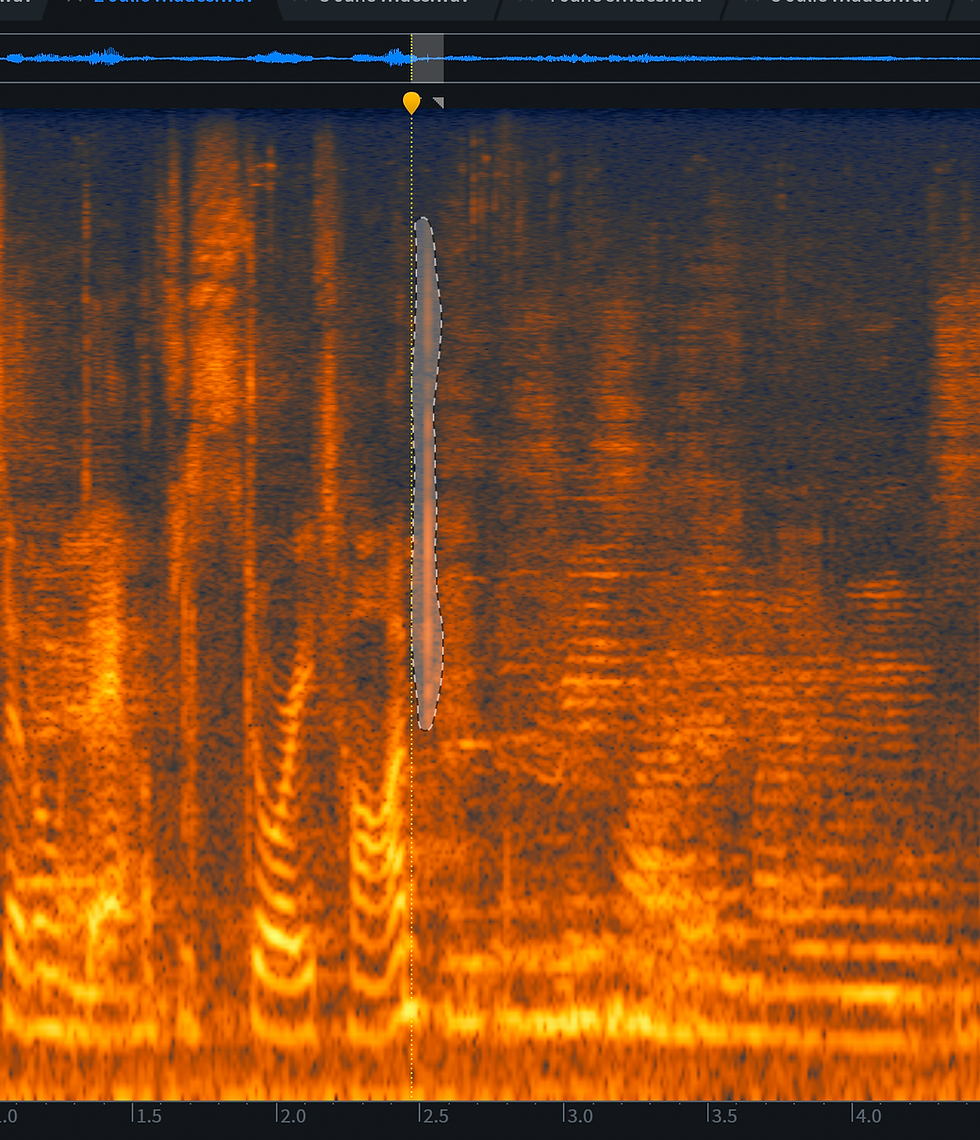
Altogether these treatments made Julie's voice clearer and more present while maintaining the vibe of a live recording.
Now I was ready to layer in Jane's AI audio recreation.
Layering in an AI recording (for real)
So I now had
Julie's track which contained her voice, the bleed of Jane's voice, the sound of the crowd and the room reverb
Jane's AI track which contained a robotic version of Jane's voice.
When blending these two tracks I had to keep phase cancellation in mind. My initial effort to make sure that the two tracks were phase-aligned had to be updated as the two women slightly moved in relation to each other. Neither of them seemed to move much mid-sentence, so I cut whole clips clips and nudged them into place when I could hear that they were getting out of phase.

The combined audio sounded like this:
I sent both of these tracks to an aux channel and did a lot more processing: high pass filter, compression, equalisation, de-essing (sibilance was introduced as a result of compression) and mouth de-click.
I would usually EQ match tracks because even if they were recorded with the same kind of microphone the positioning can change the EQ profile, and I had done a lot of processing to Jane's track, but in this case it was unnecessary. When I combined the two tracks and ran them through the same processing the loudness was consistent over a number of different playback mediums. I would usually do that fairly early in the signal chain, but I had a feeling that running them through the same processing would be enough and it was.
The final clip sounds like this
Ghost in the machine
But I promised you a strange voice from a machine's imagination and I intend to deliver. This last audio clip is just that. For whatever reason when Studio Sound was regenerating Jane's voice it added in another voice entirely, speaking what sounds like another language.
Is it another voice or is it just nonsense? It feels like a message from another kind of mind; a strange artifact of the artificial intelligence tool. I'll leave you to decide.
One of my favourite things about audio engineering is that there is always something new to learn. I think if there wasn't I would probably quit and find a new profession. I'm very interested to see where AI tools will go. I don't think they will be a panacea but I hope they reduce labour on some of the more tedious tasks. I hope that they reduce barriers and so enable a wider range of people to express themselves through sound. As with any audio tool they should be used with judgement and care in service of your creative expression.


Comments